
Overview
A Verification Check is an individual test, tailored to the specific type of verification that scrutinizes PII and returns a “passed”, “failed”, or “not applicable” status.
Within a Verification Template, every verification check can be described as:
- Enabled or disabled
- Required or non-required
Enabled versus disabled
A verification check that is enabled in an Inquiry Template will run on every Inquiry from that Template. All verification checks are enabled by default.
A verification check that is disabled in an Inquiry Template will not run on any Inquiry from that Template.
Required versus non-required
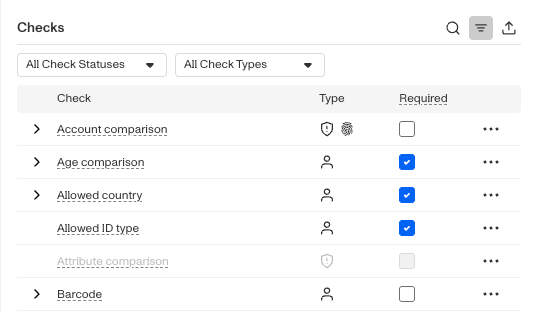
Required Verification checks affect whether a Verification attempt passes or fails. Every required check must pass in order for a Verification attempt to pass. If a single required verification check fail, the verification fails.
Non-required Verification checks do not affect whether a Verification attempt passes or fails. You can view the results of non-required checks for informational purposes.
Not Applicable - Checks include three status results: passed, failed, and not applicable. For a check to function properly, and return passed or failed, it needs to be given enough of the right type of data made that decision with accuracy. If that specific data isn’t present, it will instead default to returning Not Applicable. This mitigates false positive and false negatives.
How these settings interact
A Verification check must be enabled in order to be required.
A Verification check can be enabled, but non-required. In this scenario, the Verification check provides informational results, but does not affect whether the Verification passes or fails (and subsequently, if contained within an Inquiry Template, whether a specific Inquiry passes or fails).
We recommend that even for non-required checks you keep them enabled. Having a record of the check’s results (pass, fail, not applicable) can inform your choice when considering to enable it in the future. For example if you identify a pattern of fraudulent inquiries, and most of them failed a fraud related check that was not required, then that would be a indicator to require that check going forward.