
Overview
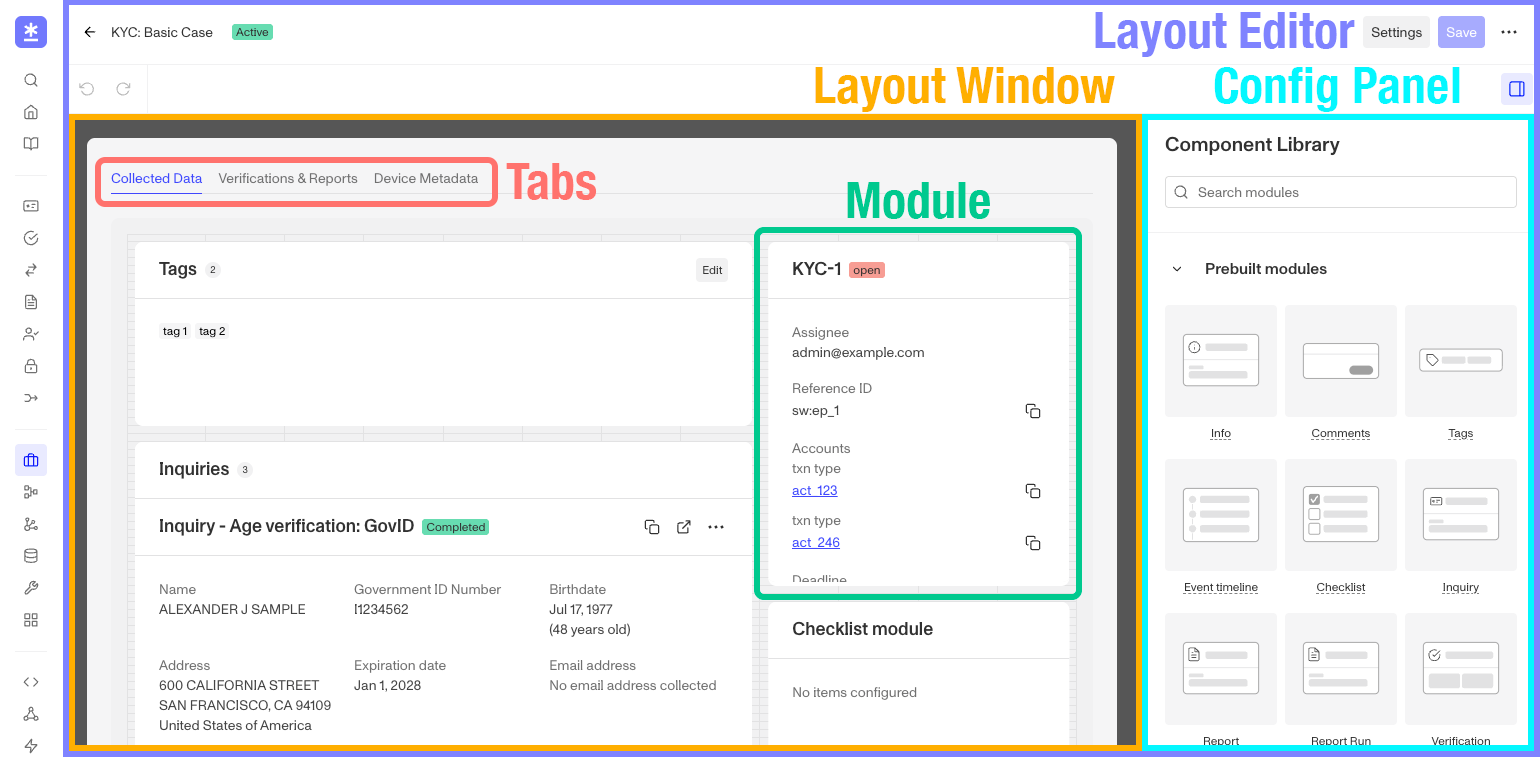
Modules are prebuilt components that you can drag and drop into a Layout. Each module contains a specific kind of information that may be useful to a user review the Case.
Layout Modules
Layout Modules are prebuilt components that you can drag and drop into the Case Layout. Each layout module contains a specific kind of information that may be useful to an user reviewing either the record.
Most layout modules are cross functional between a Case and Account Layout, and can be placed in either. Some layout modules are limited to either Cases or Accounts. The tables below will note where each one is available.
Module Visibility
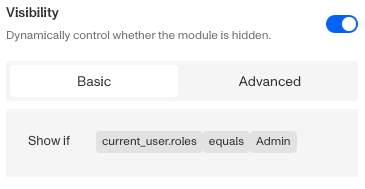
Some modules might contain sensitive information that you want to limit it’s visibility to your own team members by their role. To assist with that many modules now include a Visibility setting allowing your to configure which roles in your organization that see that particular module in that layout. You can learn more about module visibility options here.
Module Actions
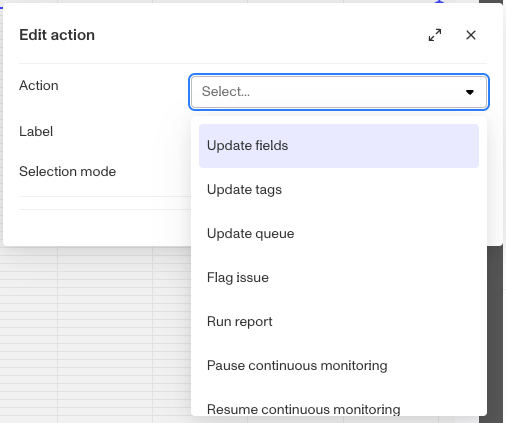
Just like Case templates support customizable Case Actions, ie workflows limited to a specific Case template, certain modules now support pre-built Actions. These System Actions are common processes Persona has noted and and now provided to be used with some of the layout modules. You can learn more about Module Actions here.
Case Modules
Below is the table of Layout modules available with a Case template layout, including which ones support Module Actions.
| Module Name | Description | Available in Cases | Module Actions |
|---|---|---|---|
| Inquiry Module | Surfaces a linked Persona inquiry and its verification details. | ✅ | ✅ |
| Transaction Module | Shows transaction records associated with the record. | ✅ | ✅ |
| Verifications Module | Displays the details of a single verification (document, selfie, database, etc.). | ✅ | ✅ |
| Account Module | Embeds the linked account record and its details. | ✅ | ✅ |
| Report Module | Shows a linked report (e.g., a watchlist or adverse-media report) tied to the record. | ✅ | ✅ |
| Report Run Module | Shows a single execution (run) of a report. | ✅ | ✅ |
| Data Table Module | A configurable table of records or rows. | ✅ | ✅ |
| Button Component | An interactive button that triggers an action or workflow. | ✅ | ✅ |
| Related Cases Module | Lists other cases connected to this record. | ✅ | 🚫 |
| Info | Shows the core fields of the case or account record (status, key attributes) at a glance. | ✅ | 🚫 |
| Comments | Lets reviewers read and post internal notes on the record. | ✅ | 🚫 |
| Event Timeline | A chronological feed of activity and events on the record. | ✅ | 🚫 |
| Tags Module | Displays and lets agents apply labels/tags to the record. | ✅ | 🚫 |
| List Matches Module | Shows watchlist, sanctions, and PEP list-match results. | ✅ | 🚫 |
| Gallery Module | Displays a gallery of images, such as captured documents or selfies. | ✅ | 🚫 |
| Data Display Module | A configurable block for showing selected data fields in a custom arrangement. | ✅ | 🚫 |
| Markdown Module | Renders static rich text or instructions authored in Markdown. | ✅ | 🚫 |
| Graph Module | Renders a link/relationship graph connecting this record to related entities. | ✅ | 🚫 |
| Signals Module | Surfaces Persona fraud and risk signals for the record. | ✅ | 🚫 |
| Checklist Module | A checklist of review steps or tasks for the case. | ✅ | 🚫 |
| Location Module | Displays location/geolocation data, typically on a map. | ✅ | 🚫 |
| Device Module | Shows device and network signals captured during verification. | ✅ | 🚫 |
| Attachments Module | Files attached to the case. | ✅ | 🚫 |
| Email Module | View and compose email correspondence tied to the case. | ✅ | 🚫 |
| Account Similarity-Selfie Module | Displays a set of other accounts in the same environment whose consented, non-redacted selfies the face-matching engine returned as confident matches. | ✅ | 🚫 |
| Assignee History Module | History of who the case was assigned to. | ✅ | 🚫 |
| Select Component | A dropdown field that reads and updates a Choice or Multiple Choices field on the case. | ✅ | 🚫 |
| Input Component | An editable field that can be added to the case layout, letting reviewers type in and save a value for a chosen string, integer, number, or date field. | ✅ | 🚫 |
| SAR | A Suspicious Activity Report module. | ✅ | 🚫 |
| STR | A Suspicious Transaction Report module. | ✅ | 🚫 |
Plans Explained
Cases Modules by plan
| Startup Program | Essential Plan | Growth Plan | Enterprise Plan | |
|---|---|---|---|---|
| Cases Modules | Available | Available | Available | Available |