
What is the Signals module?
The Signals module is a prebuilt module that can be added to an Account layout. It shows Signals for the Account in one place, which gives reviewers risk context without leaving the page.
The Signals module is only available when Account Signals is enabled for your organization. If you don’t see Signals in the Module Library, please reach out to your Persona account team.
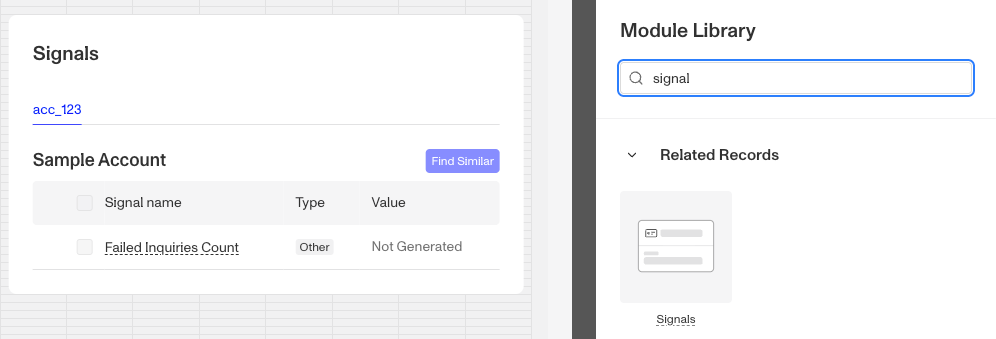
On an Account page, the module has the heading Signals and one tab for each object that has Signals:
- Account tab: the Account’s own Signals, when Signals are set up for its Account Type. The tab is named Account - followed by the Account Type name.
- Inquiry tabs: one tab for each of the Account’s most recent Inquiries (up to five) whose Inquiry template has Signals. Each tab is named Inquiry - followed by the Inquiry template name.
The Account tab comes first, followed by the Inquiry tabs, newest first. Each tab shows the object’s ID, which links to the record, and its status.
The module shows the Signals you select in its settings. A Signal that is flagged as an anomaly is always shown, even if you didn’t select it.
The module shows these messages when there is nothing to display:
- No objects to display. The Account has no Account or Inquiry Signals to show.
- Signals are not available for inquiries in progress. Shown on an Inquiry tab until that Inquiry is finished.
How do you add a Signals module?
This module is added and arranged on the Layout page. For a general overview of how the Layout page works, see Accounts: Layout Editor.
-
Navigate to the Dashboard, and click on Accounts > Types.
-
Find and click on the Account Type you want to edit, or click Create type to create a new one.
-
In the Layout Editor, navigate to the Tab you want to add the module to. Click an empty space to view the Module Library.
-
In the right toolbar, search for ‘Signals.’ The module is listed under Related Records.
-
Drag and drop the Signals module into your layout and reposition it by dragging it around.
-
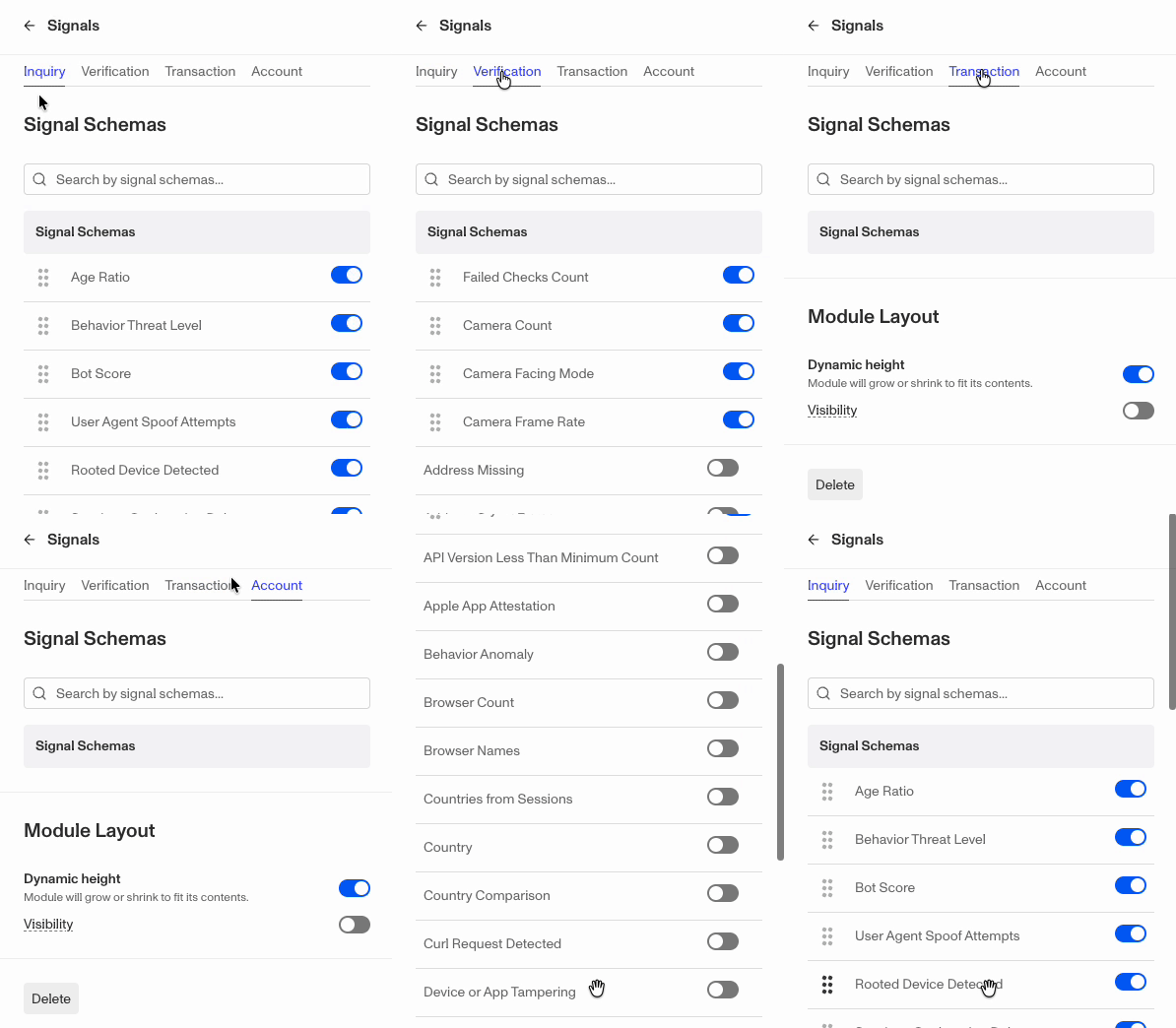
Click on the Signals module. The settings panel has four tabs: Inquiry, Verification, Transaction, and Account. On an Account layout, only the Inquiry and Account tabs change what the module shows. Account pages don’t show Verification or Transaction Signals.
-
Under Signal Schemas, toggle on the Signals you want the module to display for that object type. Use the search bar to find a Signal by name, and drag Signals to change the order they appear in. When you first open the settings, a default set of featured Signals is already turned on.
-
Under Module Layout:
- Dynamic height: Module will grow or shrink to fit its contents. This is on by default for the Signals module.
- Visibility: Dynamically control whether the module is hidden. This lets you set conditions for when the module should be displayed or hidden from view based on your requirements. You can read more about Visibility Configuration here.
-
-
Click the Delete button if you want to remove the module from the layout.
Plans Explained
Accounts Signals module by plan
| Startup Program | Essential Plan | Growth Plan | Enterprise Plan | |
|---|---|---|---|---|
| Accounts Signals module | Available | Available | Available | Available |