
Escalated Verifications execute advanced asynchronous checks after a standard GovID or Selfie verification has passed or failed. By offloading high-latency processes like multi-frame video analysis to the background, the system uses our most powerful models to evaluate complex downstream data without delaying the user. This ensures a frictionless, near-instant onboarding experience for legitimate customers while continuously catching sophisticated fraud rings and deepfakes behind the scenes.
Example use cases
- Post-onboarding fraud: A user passes verification and joins the platform, but a fraud signal surfaces later on that same verification. The customer needs immediate notice so they can freeze the account, trigger review, or take other action.
- Fraud ring detection: Some fraud patterns only become clear after Persona sees enough examples. Async models can retroactively match older verifications to known fraud patterns, flagging risk for users already in the system.
- Investigation enrichment. When a customer’s fraud or compliance team is reviewing a suspicious account, the dashboard can show that the underlying verification was also escalated, adding useful context to the investigation.
Process
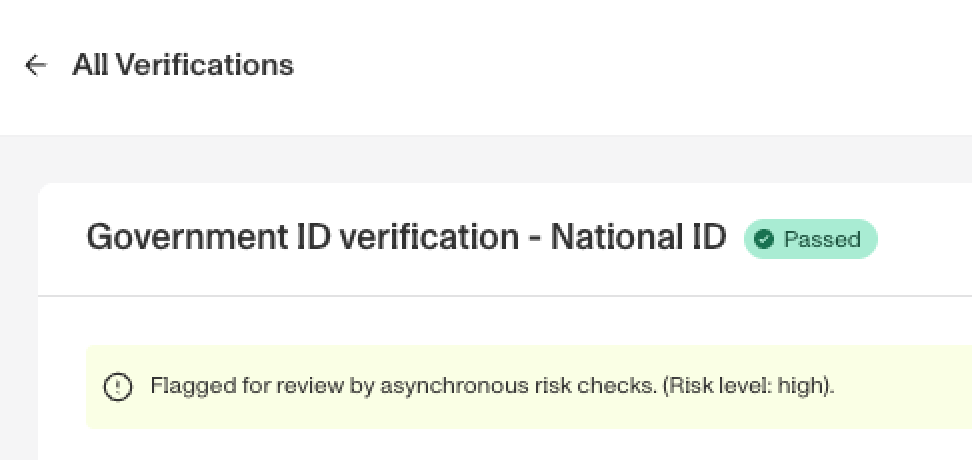
If the models indicate a ‘medium’ or ‘high’ chance of fraud risk, a “verification.escalated” webhook fires You’ll be able to see the “escalated” verifications by filtering for the property and/or navigating to the verification itself
Sample of how this will look in the dashboard
Examples of where you can use this
After a verification has been escalated, you can:
- Manually review the inquiry by creating a Case with relevant context before making the final fraud determination.
- Send the user additional verification(s) the next time they interact with your platform to gather more context and better evaluate chance of fraud.
- Automatically suspend the user’s account, with an option to reach out to your team to unlock the account.
Plans Explained
Escalated Verifications by plan
| Startup Program | Essential Plan | Growth Plan | Enterprise Plan | |
|---|---|---|---|---|
| Escalated Verifications | Not Available | Not Available | Not Available | Available |