
Collection only is a setting on a Document Verification template. When it is on, Persona collects the document from the end user but runs no automated document processing on it: no classifications, extractions, or insights. The document is stored; configure routing separately if your team needs to review it manually.
Use collection only when you want a person, rather than Persona’s automated document processing, to review submitted documents. It permits higher page-count and file-size limits, depending on the template’s settings. It does not turn off configured verification checks, and a check that depends on an extraction can still fail.
When to use collection only
Collection only is a good fit when:
- Your team wants to review collected documents without automated classifications, extractions, or insights.
- You need to accept files that standard processing does not support, such as large files or spreadsheet and word processor documents.
What changes while collection only is on
Turning collection only on changes how the verification template behaves:
- Document processing stops. Persona collects and stores the document but does not classify it, extract data, or generate insights. Collection only does not change the configured verification checks; a check that requires an extraction can still fail, depending on its settings. It does not automatically send every document for manual review.
- Higher limits and more file types. Collection only permits limits of up to 250 pages per file and per document and 200 MB per file, depending on the template’s settings. It also supports additional file types, including spreadsheets and word processor documents, that standard processing does not support.
- Deferred processing is unavailable. The Deferred processing toggle is disabled while collection only is on.
- Your processing configuration is preserved. The template stays editable, and configured classifications, extractions, and insights are kept. They do not run while collection only is on and can run again when you turn it off. Collection only does not change verification-check configuration.
Configure collection only
Collection only is set on each Document Verification template.
-
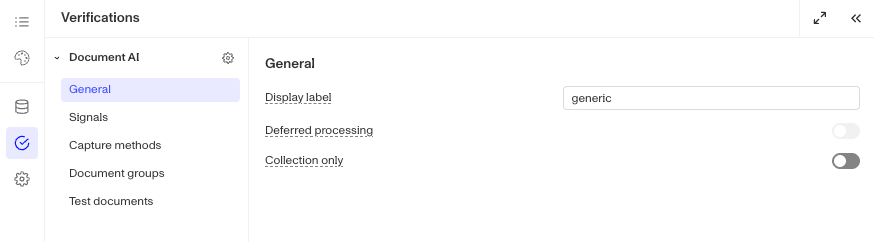
In the Dashboard, open the Document Verification template you want to change and go to its General configuration section.
-
Turn on the Collection only toggle.
-
In the Turn on collection only dialog, review what will change and click Confirm. If the template has processing configured, the dialog lists the extractions, insights, and classifications that will stop running.
While collection only is on, a banner appears in the template configuration to remind you that no processing will run.
Your classifications, extractions, and insights are kept while collection only is on. Turning it off can reduce page and file-size limits and remove collection-only file types.
Turn off collection only
- In the template’s General configuration section, turn off the Collection only toggle.
- If the template’s page or file-size limits exceed the limits for processing, a Turn off collection only dialog appears. Review the change and click Confirm. Limits above the permitted values are reduced to 20 pages per file and per document when an extraction or insight is synchronous, or 100 pages otherwise, and 32 MB per file. Collection-only file types are removed when the mode is turned off, even if no limits dialog appears.
When you turn collection only off, configured classifications, extractions, and insights can run again. Review the resulting file limits, enabled file types, and verification checks before using the template.