
What is the Case Related Cases module?
The Case Related Cases module is a prebuilt component that can be added to a Case Template. It displays all related cases associated with Accounts that are attached to the Case. You can attach an Account by using the Attach Object to Case step in a Workflow. You can define logic that governs when it appears.
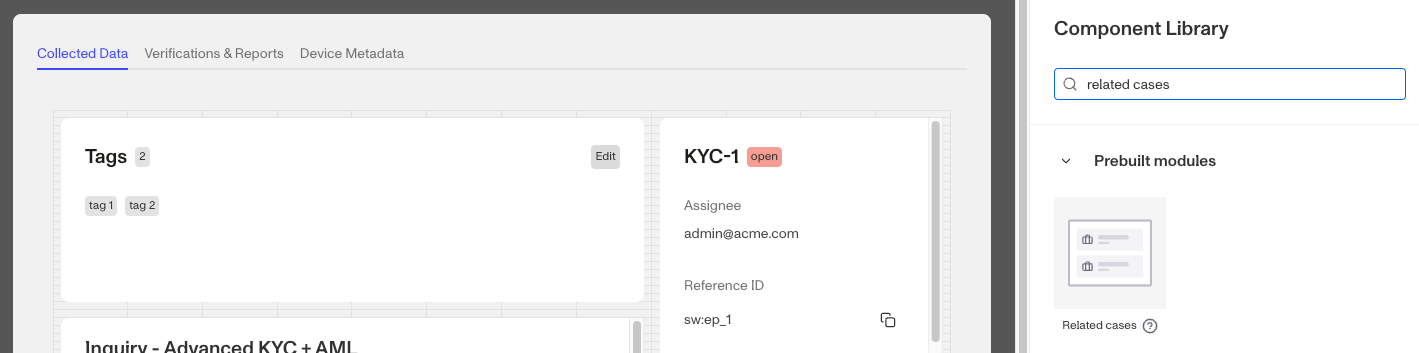
If the Case is associated with multiple Accounts (e.g. when used for KYB), this module displays a separate list of related Cases per Account.
How do you add a Related Cases module?
-
Navigate to the Dashboard, and click on Accounts > Types.
-
Find and click on the Case template you want to edit, or Create a new type.
-
Navigate to the Tab you want to add the module to. Click an empty space to view the Component Library.
-
In the right panel search for ‘Related**.**’
-
Drag and drop the Related Cases module into your layout and reposition it by dragging it around.
-
On the right toolbar, you can change the settings:
- Under Module Layout, you can change:
-
Dynamic height: Module will grow or shrink to fit its contents.
-
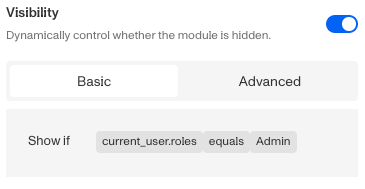
Visibility: Dynamically control whether the module is hidden. This is a toggle button that lets you set conditions for when the button should be displayed or hidden from view based on your requirements. You can read more about Cases: Visibility Configuration here.
-
- Under Module Layout, you can change:
-
Click the “Delete” button if you want to remove the module from the Case UI**.**
Plans Explained
Case Related Cases module component by plan
| Startup Program | Essential Plan | Growth Plan | Enterprise Plan | |
|---|---|---|---|---|
| Case Related Cases module component | Available | Available | Available | Available |