
What are Platform Connections
Platform Connections allow you to understand how your solution within Persona works. The Platform Connections page provides users with a clear, visual way to understand how different object types, templates, and workflows are interconnected.
As solutions grow to handle more complex use cases, it can become difficult to manage dependencies and understand how changes in one template may impact other solutions. The Connections page makes it easier to visualize these relationships, which improves maintainability and helps builders make changes more confidently.
Where can you find Platform Connections?
Platform Connections are available for the latest published version of Inquiry Templates, Verification Templates, Case Templates, Report Templates, Graph Query Templates, Account Types, Transaction Types, Tags, Workflows and Lists.
The page looks slightly different depending on which of those you open it from, because the sections it shows depend on what that template or type can create. If you came here from one product, its own article covers the sections you will see and the questions Connections answers for it:
- Inquiry Templates in Platform Connections
- Verification Templates in Platform Connections
- Case Templates in Platform Connections
- Report Templates in Platform Connections
- Transaction Types in Platform Connections
- Workflows in Platform Connections
A quick primer on templates and objects: Every Persona object (inquiry, transaction, account, etc.) is backed by a template or object type that holds the object’s configuration. For instance, inquiries behave as their template is configured and accounts have the schema defined on the account type. For the purposes of this article, we will use “templates” to refer to both templates and object types.
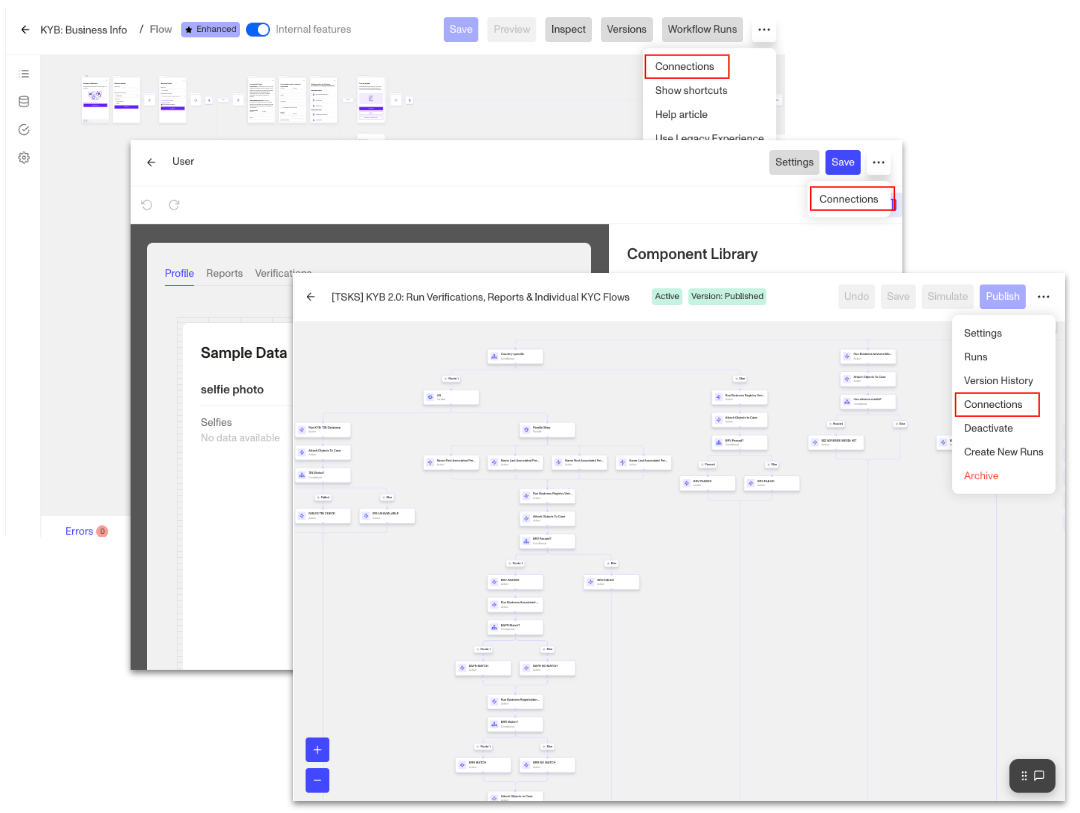
To view the Platform Connections page, navigate to the type or template or workflow > … > Connections
How do you use Platform Connections?
There are 2 different types of connections - Creates and Created by. On the Creates tab, you can find:
- Direct connections (Workflow and Inquiry Templates only): If a template is listed in this section, it means it can be directly created by the workflow or inquiry.
- Workflows: displays whether the template you’re viewing triggers any workflows.
- Downstream connections: displays whether the template you’re viewing creates any objects via its connected workflows.
- Case Actions (Case Templates only): displays if the Case Template you’re viewing triggers any Case Actions.
On the Created By tab, you will only find Direct Connections which display the upstream templates/workflows that can create the one you’re viewing.
Example
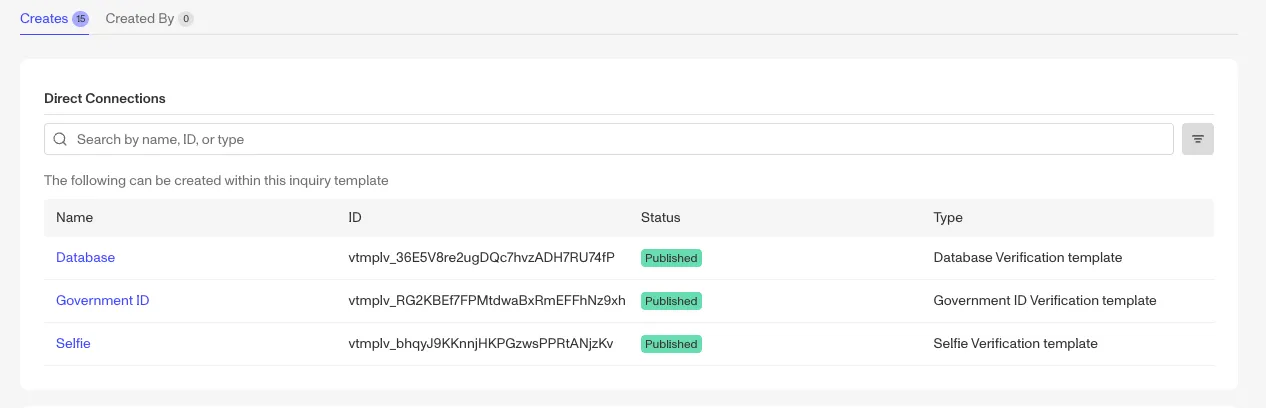
To walk through an example, if we view the Creates tab for a Database/Gov ID and Selfie inquiry template, we can see 3 verification templates in the Direct Connections section. This means this inquiry template can directly create a Database, Government ID and/or Selfie Verification.
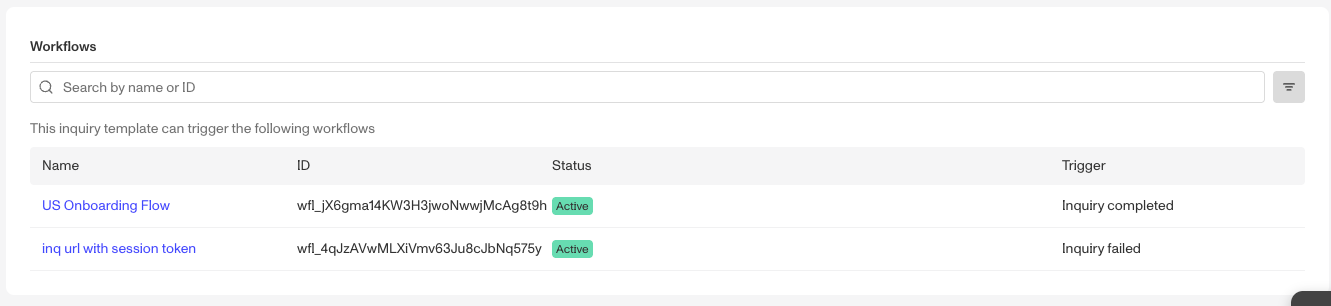
The Workflow section shows 2 workflows that can be triggered by this inquiry template; one via inquiry completed workflow and the other through an inquiry failed workflow.
The Downstream Connections section shows all the templates that can be created by any of the workflows.
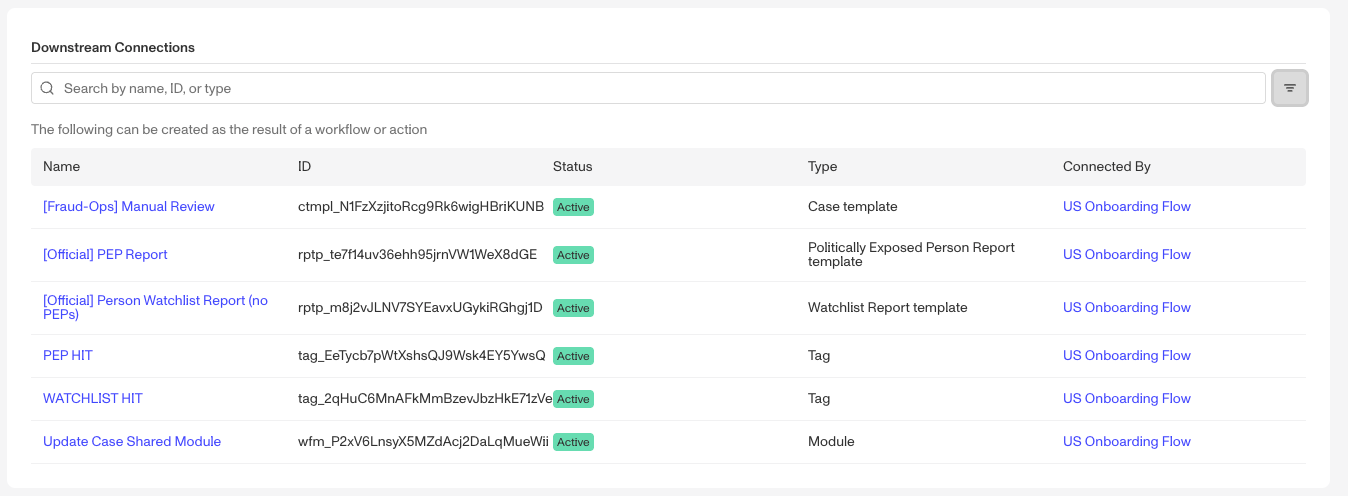
Also note that for each of these sections, you can filter by status/state and search by name, ID, or type.
When might you use Platform Connections?
Two questions bring most builders to this page, whichever product they came from.
What else does this change affect? Solutions change over time, and a template rarely sits on its own. Reading the Creates and Created By tabs before you edit tells you which Workflows and templates are involved, so nothing is overlooked. Inquiry Templates in Platform Connections walks through this for workflow logic attached to one Inquiry Template.
How was this built, and how do I build it again? When you are launching something that resembles a solution you already run, Connections lets you recall and rebuild that implementation without clicking through multiple screens or relying on memory, even if you were not involved in the original build. Transaction Types in Platform Connections walks through this for a team standing up a new Transaction Type.