
Overview
The Lifecycle model articulates the various stages and statuses that an inquiry can move through across its creation to conclusion. The model includes four phases, some of which include multiple statuses.
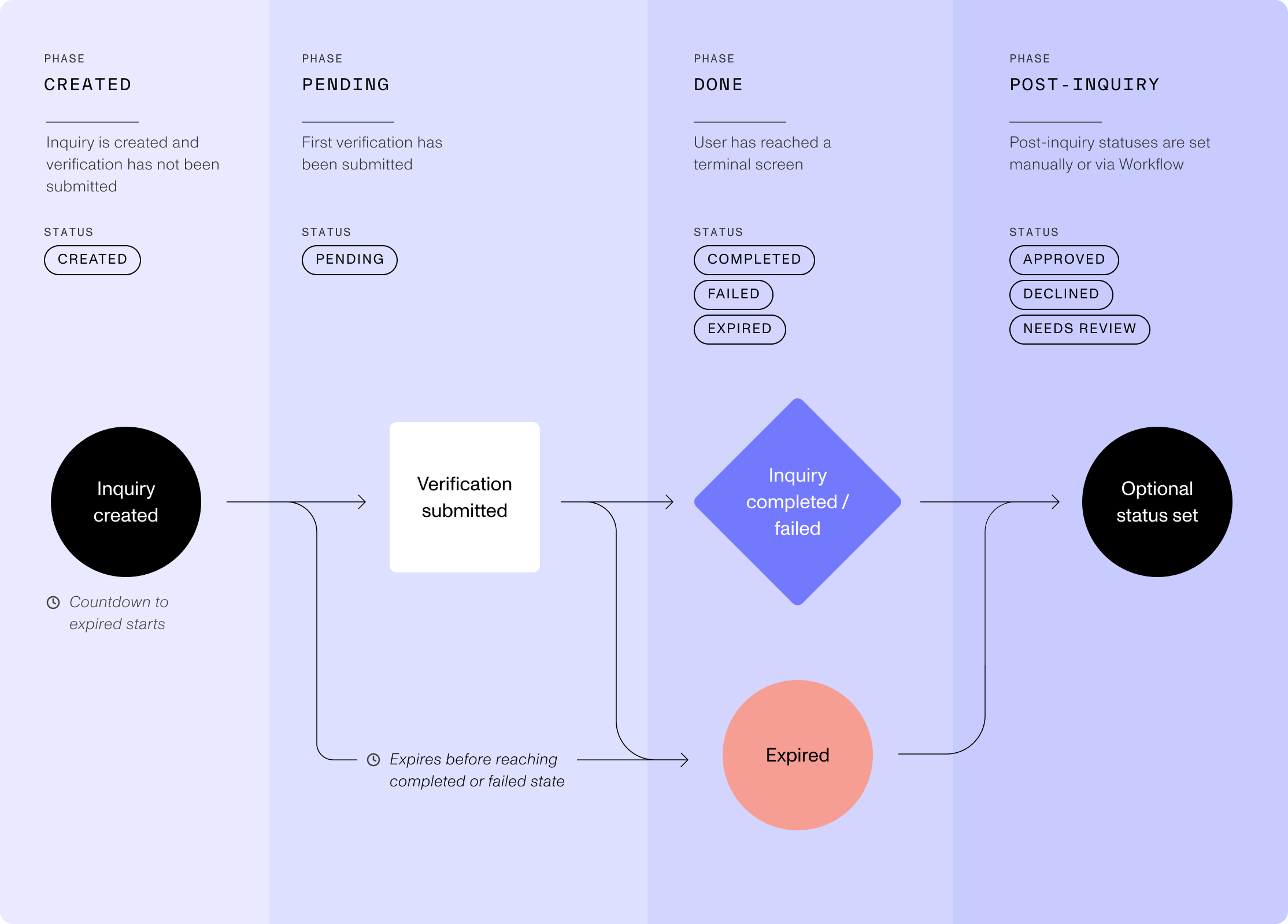
Events change Statuses
Inquiries have formal events, like inquiry.created and inquiry.approved that drive changes to the statuses. The events are useful to know when building logic on persona as these events can also be used as triggers in post-inquiry processes like workflows. Inquiry events and related statuses can change when:
- Your end user proceeds through their inquiry: starting a verification or completing the flow.
- Post-inquiry workflows apply business logic to automatically decision the inquiry or mark for manual review.
- Your organization’s members manually change the status of an inquiry.
- The inquiry expires.
| Phase | Status | Event Name | Status Description |
|---|---|---|---|
| Created | Created | inquiry.created | Set when the inquiry is first created. |
| Pending | Pending | inquiry.started | Set when the end user submits a document or begins a verification. |
| Done | Completed | inquiry.completed | Set when end user reaches the Completed screen. |
| Done | Failed | inquiry.failed | Set when end user reaches the Failed screen. |
| Done | Expired | inquiry.expired | Set when inquiry exceeds 24hrs, or configured duration, after inquiry created. |
| Post-Inquiry | Approved | inquiry.approved | Set via post-inquiry processes or manual update. |
| Post-Inquiry | Needs Review | inquiry.marked-for-review | Set via post-inquiry processes or manual update. |
| Post-Inquiry | Declined | inquiry.declined | Set via post-inquiry processes or manual update. |
The Dashboard shows the status as “Needs Review”, while the webhook event is named inquiry.marked-for-review.
Some status changes are possible only from specific statuses:
- Only an Inquiry in the Created or Pending status can expire.
- An Inquiry can move to Needs Review from any status except Approved and Declined.
- An Inquiry can move to Approved or Declined from any status.
- When an end user resumes an Inquiry, Persona sends the
inquiry.startedevent again.
What’s the difference between Done & Post-Inquiry?
While all inquiry runs will end up at some point in the Done phase, via the Completed, Failed, or Expired statuses, it only describes the inquiry from the end user perspective as they are “done” with it. But you have additional optional statuses you can use as part of deciding what to do with the inquiry, allowing you to move it to Approved, Needs Review, & Declined. These statuses can then be used by post-inquiry processes to drive additional logic and outcomes.
“Opened” vs Pending or Started
Some customers assume that when an end user opens an inquiry that a status or event triggers, but that is not the case. The inquiry will stay in the Created status even after an end user has opened the inquiry. If the end user submits a document or begins a verification, then it will move to Pending. If they take no action, it will stay in Created until the inquiry expires and is then moved to the Expired status.
What does happen when the end user opens the inquiry link is that their session starts.
Inquiry Session: A collection of data, including location and device info, related to a single and sustained network connection between the end user’s device and the Persona platform.
A single inquiry can include multiple sessions as the end user might switch devices or even resume an inquiry after it expires.
Expired windows
An Inquiry can be configured to expire after a certain duration window based on different starting reference points.

It can expire from the point of Creation, Pending/Started, or after being Resumed.
You can also set a limit on the number of sessions for each Inquiry. The default limit is 25 and the maximum is 100. When an Inquiry reaches the limit, Persona blocks new sessions for it. The Inquiry does not expire and its status does not change. This limit helps to stop bad actors who send a captured inquiry link to different devices.

Additionally, the device handoff link used for device handoffs within an inquiry can also be configured from the default of 1hr. You can configure four expiry windows at the template level: From inquiry creation, From inquiry start, From inquiry resume, and Device handoff link. You can also configure the session limit at the template level.
| Expire starting point | Default time |
|---|---|
| Creation | 24hrs |
| Pending | Same as Creation Expired’s duration |
| Resume | 24hrs |
| Device-Handoff-Link | 1hr |
Resuming an inquiry
End users can become delayed from completing the inquiry for numerous reason. You have the option to allow them to resume their inquiry, which resets the clock and gives them more time to finish.
