
This question came from a member of the Persona community, a project admin whose template names no longer matched what the flows actually did. This is useful for anyone tidying up a list of templates.
Overview
When you create an Inquiry Template, it is assigned a default name. You can rename it using either method below.
Rename from the template header
-
In the Dashboard, navigate to Inquiries > Templates.
-
Select the Inquiry Template you want to rename.
-
Click the template name (top left) and edit it.

-
Click Save.
Rename from Settings
-
In the Dashboard, navigate to Inquiries > Templates.
-
Select the Inquiry Template you want to rename.
-
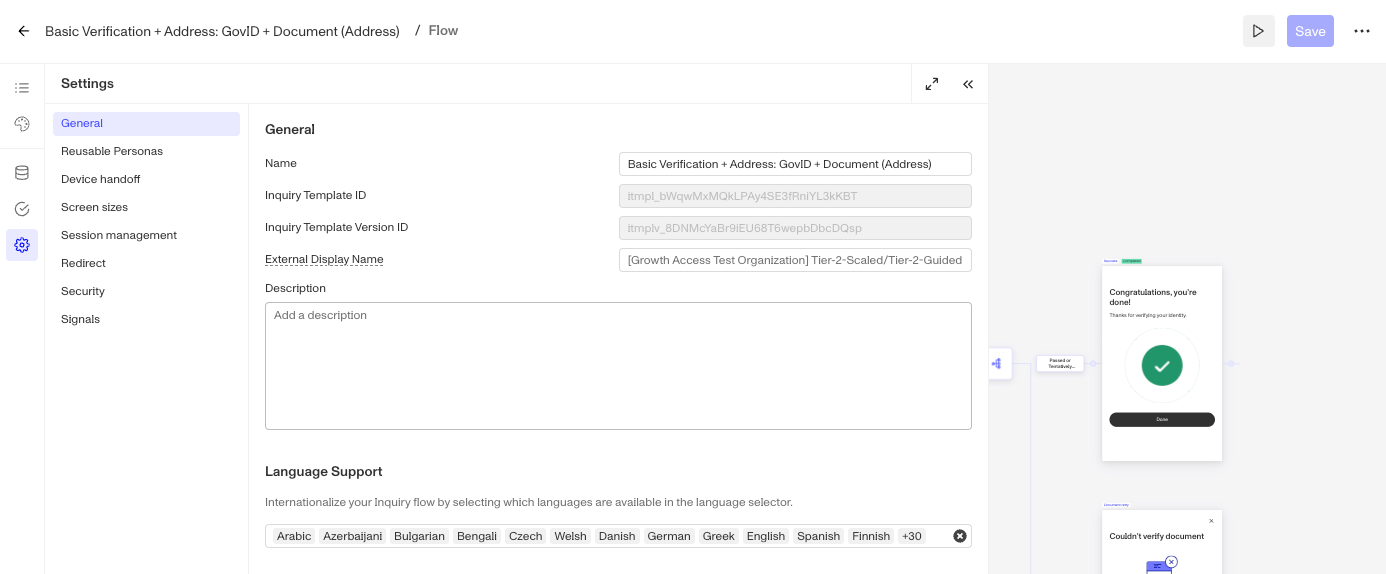
In the left nav, click the Gear icon.
-
Under General, edit the Name.

-
Click Save.
This answer was reviewed by Justin Sayarath, a product manager at Persona. FAQs, unlike other articles, are written to provide Persona Community members more specific answers to common questions. While we periodically review responses and answers, please note when this FAQ was last updated as information may have changed since then.