
Overview
Business Search for Inquiries (Business Search) is used in KYB to help an end user find their business in registry and vendor data and auto-fill its details into your Inquiry, instead of asking them to type company information from memory.
Customers use Business Search for Inquiries to:
Reduce drop-off during business onboarding
Typing a legal business name, registration number, and address correctly is slow and error-prone, especially on mobile. Business Search for Inquiries lets the end user search by name (or registration number) and country, pick their business from a short list of matches, and have Persona fill in the rest — cutting the number of fields they have to type by hand.
Improve the accuracy of data entering KYB
Because the filled-in values come from an authoritative registry or vendor record rather than free text, they arrive already normalized and correctly formatted, which reduces the mismatches that can cause a downstream Business Registry Verification to fail on formatting alone.
Set a foundation for global KYB
Business Search for Inquiries is typically the first step in a KYB Inquiry, run before verifications like the Business Registry Verification and enrichment reports like the Business Registrations Report or Business Associated Persons Report.
Where to find it
Business Search is a screen component in the Inquiry Builder. Navigate to Dashboard > Inquiries > Templates, open a template, and add Business Search from the Component Library on a screen. Configure which Inquiry fields the selected candidate’s business name, entity type, registration number, addresses, phone numbers, and associated persons (where available) should be written to.
How Business Search for Inquiries works
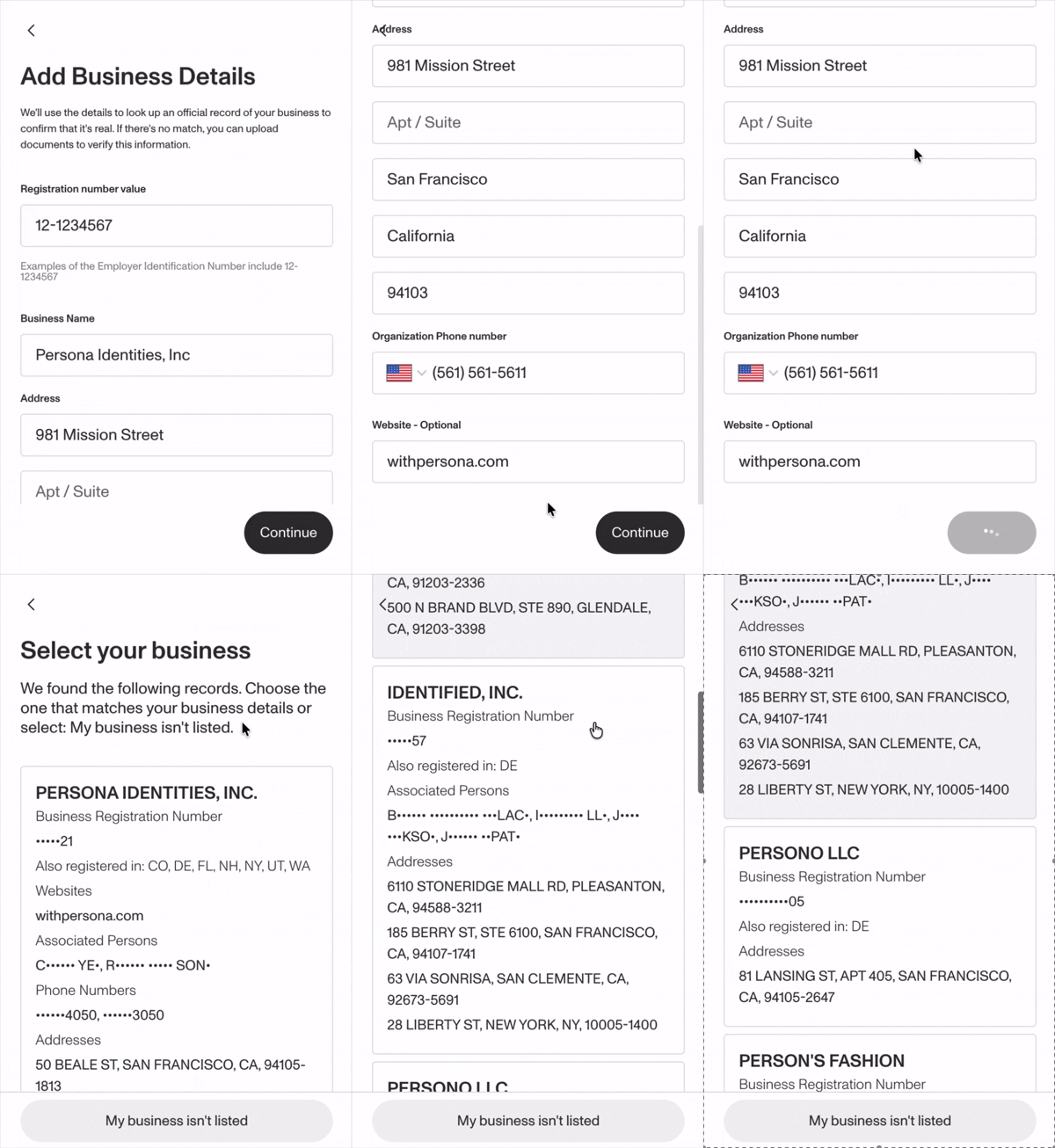
- The end user enters a business name (or registration number) and country. Street, city, subdivision, and postal code can optionally be collected to narrow the search — recommended in the US, where a name alone is often not enough to disambiguate.
- Persona searches registry and vendor data for that country and returns a short ranked list of candidate businesses, typically up to five.
- The end user selects the business that matches theirs. Persona writes that candidate’s fields into the Inquiry fields you configured.
- If none of the candidates match, or the search returns no results, the end user can skip the step and enter their business information manually — Business Search for Inquiries never blocks completion of the Inquiry.
The displayed registration number is partially masked until a candidate is selected. Business Search for Inquiries is a selection aid, not a verification, so it does not return a pass or fail result — pair it with the Business Registry Verification when you need a verified outcome.
Coverage and match quality vary by country — Business Search for Inquiries draws from different registries and vendors depending on where the business is registered. In the US, it also returns the business’s Employer Identification Number (EIN) when available — a field the Business Registry Verification does not surface. Ultimate Beneficial Owner (UBO) data is not yet returned by Business Search for Inquiries.
Using the Business Search API
Business Search for Inquiries also has an API version — the Business Search API — for customers who own their own onboarding UI and want to call Persona’s business search purely as a data source, without rendering a Persona-hosted Inquiry. It runs the same search and returns the same ranked candidate list as JSON; your application decides how to present the choice and prefill your own form.
The Business Search API is in Closed Beta and not yet generally available. To request access, reach out to our support team.
If you need further assistance, reach out to our support team.
Getting started
Business Search for Inquiries is currently in beta. To add it to an Inquiry template, or to request access to the Business Search API, reach out to our support team.
If you need further assistance, reach out to our support team.
Frequently Asked Questions
Does Business Search for Inquiries verify the business?
No. Business Search for Inquiries returns a ranked list of possible matches so the end user can disambiguate their own business; it does not return a pass or fail result. Use the Business Registry Verification when you need a verified outcome.
What happens if an end user’s business isn’t in the results?
They can skip the step and enter their business information manually. Business Search for Inquiries never blocks the end user from completing the Inquiry.
Does Business Search for Inquiries return Ultimate Beneficial Owner (UBO) information?
Not yet. UBO / associated-persons data is on the roadmap but not returned by Business Search for Inquiries today. Ask your Persona account team about the Business Associated Persons Report for UBO enrichment on US and UK businesses.
Is Business Search for Inquiries the same as the Business Search API?
They share the same underlying search engine and data sources. Business Search for Inquiries is the hosted-UI surface that writes the selected match into your Inquiry form; the Business Search API returns the same candidate list as JSON so you can prefill your own form outside of a Persona Inquiry.
Plans Explained
Business Search for Inquiries by plan
| Startup Program | Essential Plan | Growth Plan | Enterprise Plan | |
|---|---|---|---|---|
| Business Search for Inquiries | Not Available | Not Available | Not Available | Available |