
What is the Inquiry AAMVA Verification module?
The AAMVA Verification module adds an AAMVA Verification to your Inquiry Template which conducts silent background driver’s license verification to your Inquiry flow. Unlike other Verification modules, it does not add any end-user-facing screens, it runs automatically using data already extracted from a Government ID scan earlier in the flow.
AAMVA verification checks driver’s license information against state DMV databases and only applies to US driver’s licenses and state IDs. It does not run on passports or international IDs.
This module requires a Government ID verification step earlier in the flow with a passing barcode check. The barcode captures the back of the ID and is required for AAMVA data extraction. Requiring the barcode check on the Government ID verification step means AAMVA only runs when the necessary data is available.
How do you add an Inquiry AAMVA module?
-
Navigate to the Dashboard, and click on Inquiries > Templates.
-
Find and click on the Inquiry template you want to edit, or Create a new template.
-
In the Flow Editor, click the ”+” sign in the flow where you want to add a module. Place it after your Government ID verification step.
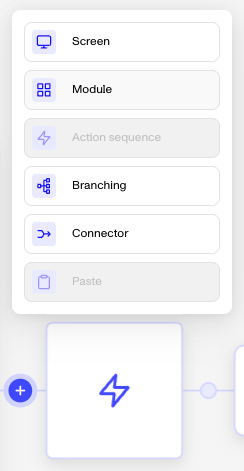
-
Select Module from the list of options.
-
Choose AAMVA and then click Insert.
The module adds the following to your flow:
- A branching step that checks the ID is a US driver’s license or state ID and that the barcode check passed
- An AAMVA verification step that runs silently against the DMV database
- A pass/fail branching step. There is no retry path, as AAMVA either matches or does not
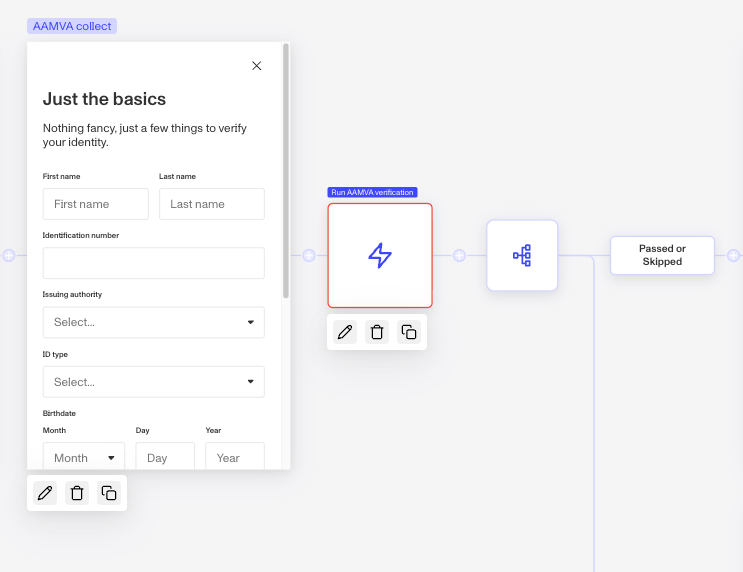
After inserting the module, you can configure which attribute match checks are required (name, birthdate, ID number), adjust the branching logic to route non-US or non-DL IDs around the AAMVA step, and configure the fail route. For guidance on configuring verification checks, see Configuring AAMVA Verification checks.
Module placement
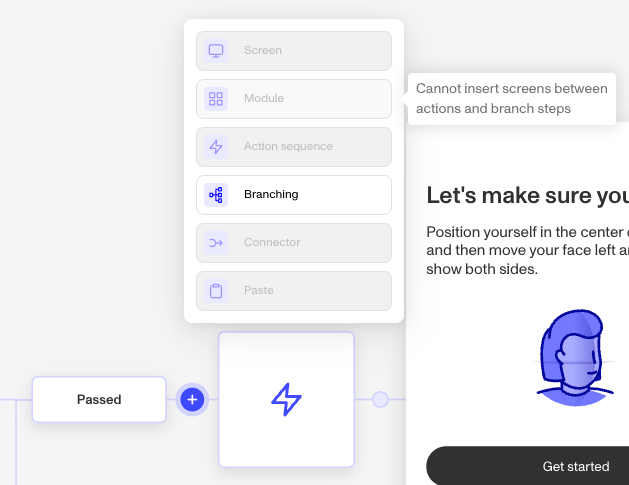
Not all locations in the flow support modules. If the Module option is grayed out when you click ”+”, hover over it to see why it can’t be inserted there.
Plans Explained
AAMVA Verification module by plan
| Startup Program | Essential Plan | Growth Plan | Enterprise Plan | |
|---|---|---|---|---|
| AAMVA Verification module | Not Available | Available | Available | Available |