
What is the Inquiry Database Verification module?
The Database Verification module adds a pre-built identity data collection form and background database verification step to your Inquiry flow. It collects personal information from the end user and checks it against an identity database.
Unlike other Verification modules, Database Verification does not include a retry path or success/fail screens. You will need to add a Standard Success step and a Standard Failed step separately after inserting this module.
How do you add an Inquiry Database Verification module?
-
Navigate to the Dashboard, and click on Inquiries > Templates.
-
Find and click on the Inquiry template you want to edit, or Create a new template.
-
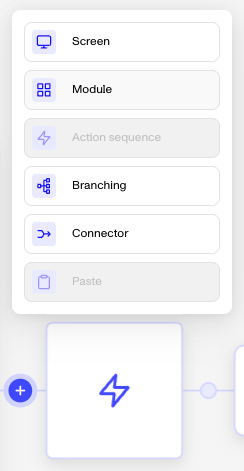
In the Flow Editor, click the ”+” sign in the flow where you want to add a module.
-
Select Module from the list of options.
-
Choose Database Verification and then click Insert.
-
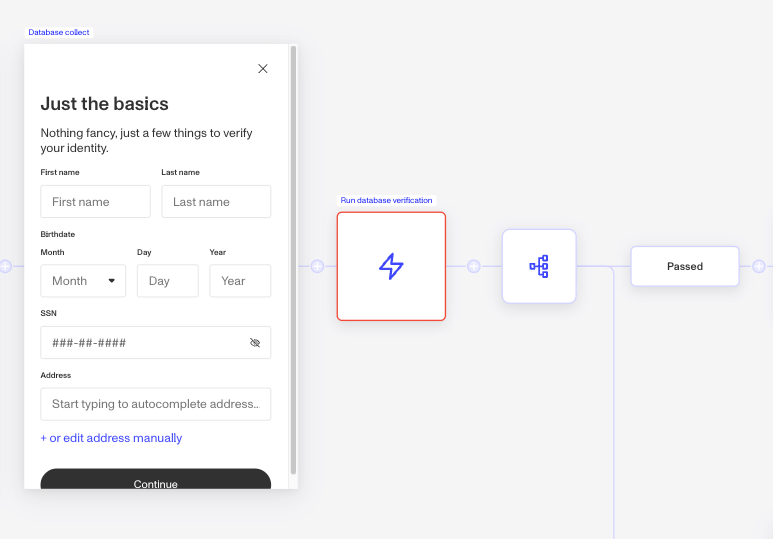
The module adds the following to your flow:
- A data collection form screen that prompts the end user to enter their name, birthdate, address, and SSN.
- A Database Verification step that runs a background identity check using the submitted information.
- A pass/fail branching step. There is no retry path, Database Verification either passes or fails.
After inserting the module, add a Standard Success step and a Standard Failed step to the pass and fail branches. You can then configure which fields appear on the collection form, adjust match requirements per field, and toggle whether a tentative match counts as passing. For guidance on configuring Verification checks, see Configuring Database Verification checks.
Default configuration
When first inserted, the module is set to partial match on all required fields:
| Field | Default match requirement |
|---|---|
| First name | Partial match |
| Last name | Partial match |
| Birthdate | Partial match |
| Address | Partial match |
| SSN | Partial match |
| Email address | None |
| Phone number | None |
The collection form uses the following standard field keys: name_first, name_last, birthdate, address_street_1, address_city, address_subdivision, address_postal_code, social_security_number.
Module placement
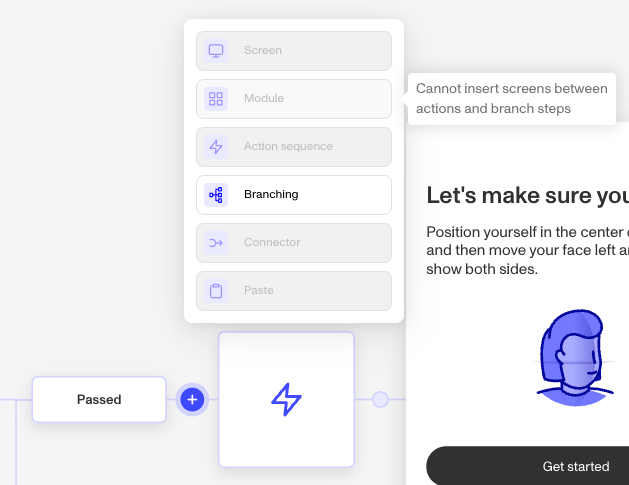
Not all locations in the flow support modules. If the Module option is grayed out when you click ”+”, hover over it to see why it can’t be inserted there.
Plans Explained
Database Verification module by plan
| Startup Program | Essential Plan | Growth Plan | Enterprise Plan | |
|---|---|---|---|---|
| Database Verification module | Not Available | Available | Available | Available |