
This question came from a member of the Persona community, a product manager improving their user onboarding experience. This is useful for anyone looking to understand the address input component within Inquiries.
Question
Why does the address input component only accept US addresses?
Answer
The Address Input component within Inquiries can actually accept addresses from all over the world.
If you’re testing the component in a sandbox Inquiry, preview mode, or simulate mode and it seems to only accept US addresses (or addresses from a specific country), you may be running into a common misunderstanding related to how the component’s country is configured. The country that determines address autocomplete and validation behavior is a component setting — not something the end user chooses from a field that’s always visible.
The short answer is that if the input component is not configured, it falls back to US as the country for the address.
Let’s dig into how it works in the Flow Editor.
How the Address Input component is configured in the Flow Editor
When you add an Address Input component to a screen and select it, its settings open in the right panel of the Screen Editing View. The panel has three tabs: Design, Data, and Logic.
The Data tab and field mapping
The component’s behavior lives on the Data tab. It’s organized into sections. The key ones for this question are:
-
Fields: maps each part of the address (Street 1, Street 2, City, Neighborhood, Subdivision, Postal code, Business name, Country code) to an Inquiry Field key. For example, Street 1 might map to a field key like
address_street_1, while City maps toaddress_city.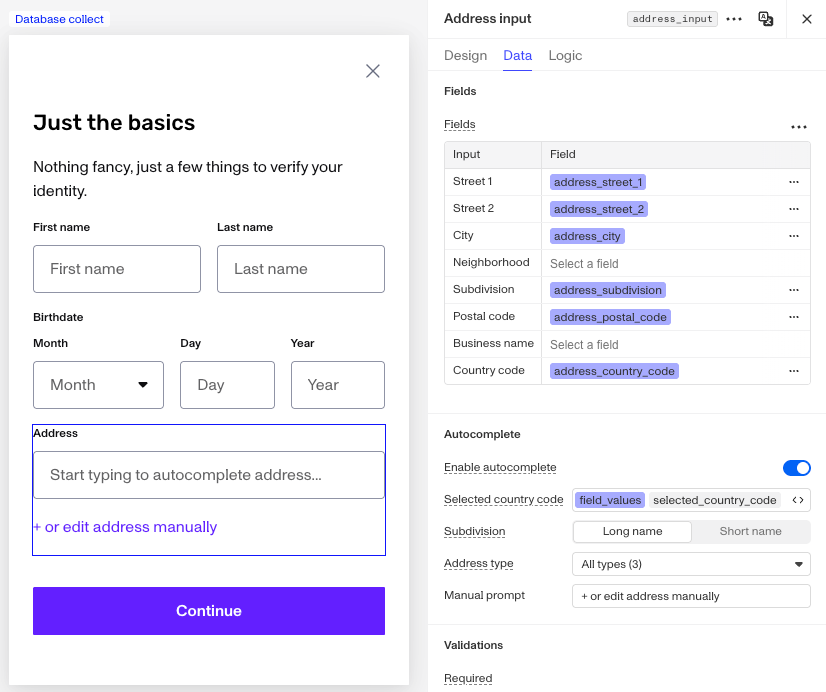
-
Autocomplete: controls address autocomplete. This is where the country configuration lives.
-
Validations: sets required fields and custom validation rules.
Things can get tricky if you collect multiple addresses within a single Inquiry Template (e.g., a personal address and a business address). In those cases, you must create separate fields for each address. Otherwise, users could unintentionally overwrite earlier entries because the same field keys would be reused. Persona lets you manage, at a granular level, where you store the inputted values using Inquiry fields.
For a deeper look at managing fields, check out the Inquiries Field Editor.
Why the country field isn’t visible to end users
You may notice that the country field doesn’t appear when previewing an Inquiry or when a user completes one. Instead only fields like Address Street 1, Address Street 2, City, Postal Code, and Subdivision/State are shown.
There are up to two country-related settings behind the scenes:
-
Country code field mapping: If you look at the Fields section on the Data tab, you’ll see a Country code row that maps to a field key (commonly
address_country_codeorselected_country_code). This is where the collected country value is stored when one exists. -
Selected country code: In the Autocomplete section, there’s a Selected country code setting. This dynamically determines the country used for address autocomplete and validation. You can point it at a field value or a form expression that resolves to a country code (e.g.
US,GB).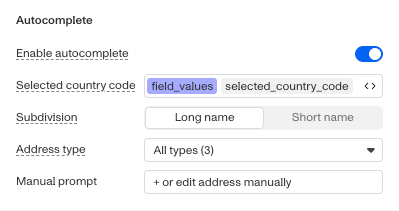
Here’s the important part: the Address Input component relies on the value of the resolved country to choose which address format and validation to apply.
The component picks the country using this order:
- The Selected country code setting’s value is a field value or expression you selected on the Data > Autocomplete section.
- A previously collected country code stored in the mapped Country code field (for example from a Country Select component on a preceding screen).
- A template-configured default country code (set at the template level, not as an editor control on this component).
- If none of the above resolve, the component falls back to US.
That final fallback to US is exactly why an unconfigured Address Input component appears to “only accept US addresses”, particularly for validation of the postal code, where US uses a strict 5-digit ZIP format.
How to fix the behavior
The fix is to make sure the component’s country setting is wired to the country you expect, rather than relying on the US fallback.
-
Update the Selected country code setting (recommended):
On the Data tab, open the Autocomplete section and set Selected country code to the field that holds the user’s country — most commonly the
selected_country_codefield populated by a Country Select component on a preceding screen, or to a form expression that resolves to a country code. This ensures the address component accepts addresses for every country a user can pick. -
Check your Inquiry Template configuration:
Review the Inquiry Template and confirm that:
- A Country Select component (or similar) writes to the same country field that the Address Input component reads.
- Ideally, the Country Select component should appear immediately before the Address Input component.
- If other steps (like Verifications, Action Steps, etc.) occur between the country selection and the address input, make sure nothing else is overwriting the country field unexpectedly.
-
Test selecting a different country:
If a Country Select component (or another component updating the country field) exists on a preceding screen, select a different country during testing. This should allow the Address Input component to accept non-US addresses.
This answer was reviewed by Ryan Cole, a content manager at Persona. FAQs, unlike other articles, are written to provide Persona Community members more specific answers to common questions. While we periodically review responses and answers, please note when this FAQ was last updated as information may have changed since then.